Ochre — Smearable Pigment Shop
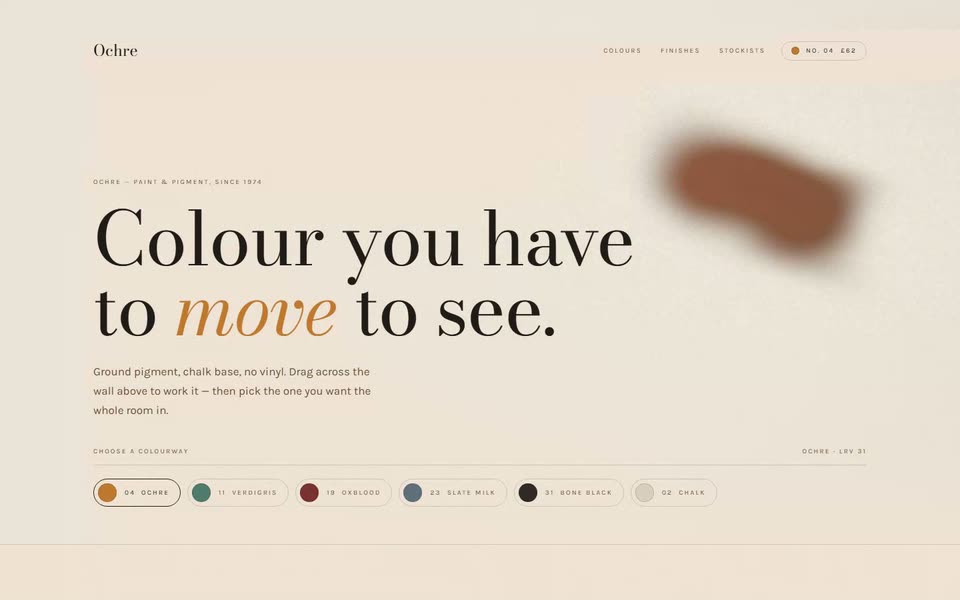
An ecommerce page for a paint house, driven by what you do rather than where you have scrolled. The hero is a field of wet pigment you smear with the cursor — a ping-pong framebuffer simulation, dye advected by curl noise — and choosing a colourway repaints the whole page and changes the pigment coming off your next stroke.
The prompt — 7 sections
The idea
Every other motion template answers the scrollbar. This one answers a person.
The hero is a wall of wet paint: drag across it and pigment follows the
cursor, pools, and drifts on after you stop. Pick a colourway from the
swatches and the whole page repaints — *and* the next stroke comes out in the
new colour while the pigment already on the wall keeps the old one, which is
what actually happens when you paint over something.
The interactive surface is wired to the variant selector. That is the whole
template: on a shop page, the hero should be the product, not a picture of it.
Pigment field
A **ping-pong framebuffer** simulation — two render targets, swapped every
frame, so each frame is a function of the last. That feedback loop is the only
reason a stroke can persist after you stop moving; a stateless shader would
have to redraw the whole history every frame.
Set both targets to `HalfFloatType` where available and `UnsignedByteType`
where not, with `LinearFilter`, no depth buffer, no stencil.
Run the simulation **below** display resolution but not far below — around
`0.72`. It is a full-surface feedback loop every frame so the saving is real,
but drop under about `0.7` and the filaments the velocity field creates are
gone before they reach the screen.
### The simulation pass
Not Navier-Stokes. There is no pressure solve and no divergence correction —
a landing page is not a wind tunnel. Dye advected by curl noise plus a pointer
impulse reads as pigment in water at a fraction of the cost.
```glsl
// Curl of a scalar noise field: divergence-free by construction,
// which is why it swirls instead of piling up.
vec2 curl(vec2 p) {
float e = 0.035;
return vec2(snoise(p + vec2(0, e)) - snoise(p - vec2(0, e)),
snoise(p - vec2(e, 0)) - snoise(p + vec2(e, 0))) / (2.0 * e);
}
```
Use **two octaves**, not one. The coarse one moves the mass around, the fine
one striates it; one octave on its own just blurs:
```glsl
vec2 vel = curl(uv * 2.6 + vec2(t * 0.045, -t * 0.03)) * 0.0022
+ curl(uv * 7.4 - vec2(t * 0.06, t * 0.04)) * 0.0011;
```
Then, in order: add a downward push from scroll velocity; add the pointer's
own frame-to-frame delta, weighted by a gaussian around the cursor, so a fast
swipe drags colour with it; sample the previous frame at `uv - vel`; multiply
by `uDecay` (about `0.9855`); and add a splat under the cursor.
Keep the splat tight — `exp(-d * d * 1.7)` at a radius near `0.105` of canvas
height. A wide, soft falloff reads as an out-of-focus blob rather than
something wet.
Multiply the pointer offset by `vec2(aspect, 1.0)` or splats come out as
ellipses on a wide viewport.
### Idle drift
Until someone takes over, drive a slow wandering pointer around a Lissajous
path at reduced strength, and cut it back further once the page has been
touched. Two reasons: the hero is never a blank wall on load, and the
invitation to drag is *visible* rather than written down.
Stop laying pigment about 90 ms after the pointer stops moving, or a parked
cursor burns a hole in the canvas.
### The composite pass
The dye is not drawn *on* the ground so much as soaked into it — paint on a
wall darkens the wall, it does not sit on top of it.
```glsl
float wet = smoothstep(0.02, 0.55, dye.a);
vec3 col = mix(ground, dye.rgb, wet * 0.92);
// pooled pigment at the dense centre
col = mix(col, dye.rgb * 0.72, smoothstep(0.55, 0.98, dye.a) * 0.5);
```
Then canvas tooth: two hashes at different cell sizes, applied as a multiply
around 1.0 so it survives the paint rather than sitting over it. Then a light
vignette, the dissolve-in, and grain.
Changing colour without wiping the canvas
Read the current colour and ground through a ref that an effect keeps
up to date, **not** from the effect's dependency array. Put them in the deps
and every colourway change tears down the render targets and wipes the wall.
This is the single thing most likely to go wrong.
Repainting the page
The colourway is the page's only real state — this is a click, not a frame, so
React state is exactly right here. Derive every token from it:
```js
"--paint": paint,
"--ground": `color-mix(in oklab, ${paint} 13%, #F7F4EE)`,
"--ground-deep": `color-mix(in oklab, ${paint} 26%, #F7F4EE)`,
"--soft": `color-mix(in oklab, #1B1815 58%, ${paint})`,
"--rule": `color-mix(in oklab, #1B1815 18%, transparent)`,
```
The ground is a wall painted in the colour, not the swatch itself — 13% is
about right. Put a 900 ms `cubic-bezier(0.16, 1, 0.3, 1)` transition on it:
the repaint should feel like the wall drying, not like a theme toggle.
Give the masthead's cart chip the selected swatch and number, so the chrome is
never out of step with what the page is currently painted in.
Page
1. **Hero** — full viewport, type bottom-left over the pigment, then the
swatch row. Scrim leans left and fades to the ground at the bottom edge:
enough to hold the type, not enough to hide the paint.
2. **Buy** — a painted panel beside the price ladder. Build the panel from a
three-stop gradient of the colour rather than an image, so it repaints with
everything else. Three sizes, one marked "Most bought", a solid add button
and a ghost sample button.
3. **The card** — the six colourways in a `gap-px` grid over the rule colour,
each with a swatch, a name, a number and one honest line about how it
behaves. Badge the selected one.
4. **Specification** — finish, coverage, base, VOC, dry times. Set on
`--ground-deep` so the section reads as a deeper coat.
5. **Editorial** — the one filmed image on the page, behind a left-leaning
scrim.
6. **Footer.**
Fixed masthead: hold the background gradient near full opacity through the
bar's own height before letting go. A fade that reaches transparent by the nav
baseline lets content collide with it.
Palette and type
Paper `#F7F4EE`, ink `#1B1815`, and six colourways that are the actual
content: Ochre `#C0762A`, Verdigris `#4C7A6C`, Oxblood `#7A2E2C`, Slate Milk
`#5C6E7A`, Bone Black `#2A2724`, Chalk `#D8CFBF`.
Bodoni Moda for display — high contrast, real italic, and it earns the
heritage the copy claims. Karla for body.
**No monospace anywhere.** Every other template in this library sets its
labels in mono; a paint catalogue would set them in letterspaced caps of the
body face, so this one does. Ten pixels, `0.22em`.
Degradation
- **`prefers-reduced-motion: reduce`** — a static radial wash from the colour
to the ground. Still repaints on selection, still shows the product.
- **No WebGL** — same wash.
- The page is a working shop either way: the simulation is the best version of
the hero, not the only one.